Just like the overwhelming majority of companies in the telecommunication industry, T-Mobile has an inconvenient device locking policy in place that affects all of its customers. Whether you just signed up for a new data plan or you're right in the middle of a contract, you're certainly going to have a locked T-Mobile phone.
Having a locked phone, no matter what carrier it's locked to, restricts you to their network. If you were to try and use a SIM card from Verizon or AT&T, your T-Mobile locked phone wouldn't allow you to. Removing the lock is often tedious and can only be done with an unlock code, something T-Mobile charge a hefty fee for. This post is going to tell you how to get a T-Mobile unlock code for free and the best ways to do so.
What is a T-Mobile Network Unlock Code?
A T-Mobile unlock code is exactly what it sounds like. It is a sequence of numbers that you can enter into your phone and if the code is valid, your phone will no longer be bound to the T-Mobile network. Once the code is accepted, your phone will then allow you to use SIM cards from any other network and not just T-Mobile.
All T-Mobile phones come with a network lock, so you'll need such a network unlock code for unlocking.
Depending on the situation, you'll either be given a temporary unlock code or a permanent unlock code. Temporary codes usually don't cost anything but will only unlock your phone for a short period, typically a week or two. On the other hand, a permanent code will remove the carrier lock forever, although additional charges may be added to your bill.
Ultimately whether or not you'll be eligible for a free T-Mobile unlock code depends on the specifics of your contract. The main takeaway here is that an unlock code frees you from the limitations that are imposed on you by T-Mobile.
How to Get a Free T-Mobile Unlock Code?

One way that you can get yourself a free unlock code for T-Mobile is to contact them directly and ask for one. Naturally, it's not as simple as them giving you the code – there are a bunch of hoops that you have to jump through and there's a waiting period for the code to be sent. This isn't uncommon for carriers but if you don't mind waiting, this might be the method you want to try.
For readers who are interested in this approach, there are two things you'll need to do. First of all, we need to make sure you meet the requirements (unlock policy) outlined by T-Mobile.
Requirements to Get T-Mobile Unlock Code for Free
- The phone you're unlocking must have been sold by T-Mobile
- Your T-Mobile account should have no outstanding payments
- The phone should not be blacklisted for any reason (e.g., flagged as stolen or linked to fraudulent activities)
- If you have a T-Mobile data plan/contract, then it must have been paid in full
- You should not have already submitted more than 2 unlock requests for other devices on your T-Mobile account
- If your phone is not on a contract and is pre-paid, it must have been on the T-Mobile network for a minimum of 12 months
Steps for Getting T-Mobile Network Unlock Code for Free
Now that you know whether or not you are eligible for T-Mobile's free unlocking service, the next step is to go through the unlock process.
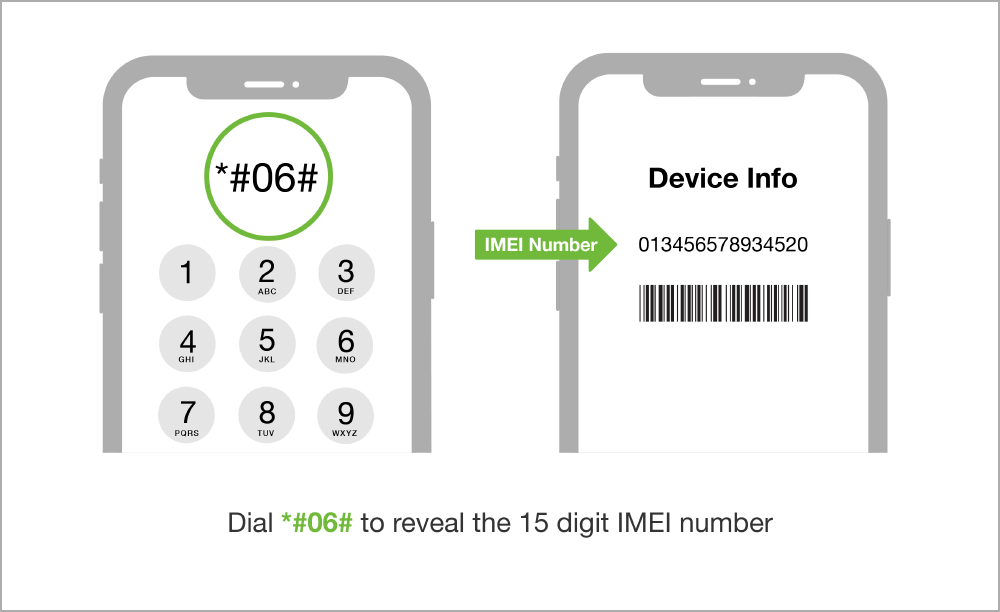
Step #1 – Start by obtaining your phone's IMEI number. For both Android and iPhone, this can be done by dialling *#06# and the IMEI will appear on the screen.
You may like: How to Find IMEI Number Without a Phone?
Step #2 – Make sure that you have your T-Mobile account number on hand and then get in touch with T-Mobile's customer support team either via live chat, calling them, or email.
Step #3 – Once you are connected to an agent, explain that you are requesting your phone to be unlocked from the network.
Step #4 – At this point, they will ask for your account number and several other personal details to verify that you are the account holder and can make this decision.
Step #5 – After you provide them with your details and they confirm everything, your unlock request will be submitted. Within 10 working days, you will receive an email or text alerting you that the unlock was successful, along with an unlock code and how to use it.
As you can see, the big catch with getting a T-Mobile unlock code for free this way is how long it'll take. 10 working days isn't a short period of time and if you're paying for a monthly plan, you could end up paying for an additional month for a service you no longer want. That being said, this is one way you can get your phone unlocked for free.
Apart from that, your T-Mobile account should be in good standing to be eligible for unlocking. Don't have a T-Mobile account? Here is a guide for you: Unlock Your T-Mobile Phone Without an Account
Better Option to Get T-Mobile Unlock Code

Alternatively, for those who don't want to be left idly waiting for an unlock code, the better option is to use DirectUnlocks. With its remote T-Mobile phone unlocking service you don't have to worry about weeks of waiting because your phone can be free of restrictions within mere hours.
- Legitimately unlock your phone without voiding the warranty
- Your phone will be unlocked remotely and you can continue using it during the unlock
- There is no need for you to jailbreak or root your phone
- 100% success rate at unlocking any iPhone or Android smartphone
- Permanently unlocks your phone even if you decide to factory reset it
- Unlocks your phone in less than 1 hour!
DirectUnlocks is by far the best service on the market and undoubtedly the most effective too. To get a better idea of how the process works, take a look at the steps we've detailed below.
Step #1 – First, get your phone's IMEI number. You can do this in the Settings app or by dialling *#06# which will prompt you with the number.
Step #2 – Use the form below to enter the IMEI number that you were shown, then click on Unlock Your T-Mobile Phone to continue.
Get Your T-Mobile Unlock Code Now
Step #3 – You will now be prompted to enter your payment details to pay for your order. Do this now.
Step #4 – Lastly, once your payment has been successfully processed, you will be sent a text and an email to confirm that the unlock is finished.
All you have to do is obtain your IMEI number and our experts will handle the rest! This entire process takes only a few minutes and shortly after, you'll have a phone that is no longer restricted by a single carrier's limitations.
Conclusion
Having the option to get a T-Mobile unlock code for free is great, especially considering that most carriers will demand payment for this service.
Unfortunately, T-Mobile's grace ends there and has the downside of taking as long as 2 weeks to be processed. For some people, this isn't an issue, but the majority of us don't want to wait that long.
That's why using a speedy service like DirectUnlocks is the ideal solution. In no time at all you'll be free to use any carrier's SIM card in your phone and enjoy their data plans!
You May Like