If you purchased a phone from a company like Verizon or Boost Mobile, you might have difficulty switching to another phone company if your phone is locked. Cellular carriers regularly lock phones to prevent customers from switching to competitors.
While this can be frustrating, don't worry – there is a quick and easy way to unlock a locked phone from carrier.
Carriers can't legally prevent you from unlocking your phone.
They only get away with it because many people don't know that they can lawfully unlock their phone – online – in a matter of a few hours.
Difference Between a Carrier Locked and Unlocked Phone
It's not easy to tell the difference between a locked and unlocked cell phone at first glance, as they look the same.
However, a locked phone has a software restriction built in that prevents it from being used with any carrier other than the one that locked it in the first place.
When Verizon sells you a phone, for example, they install this technical restriction to prevent you from using it with another phone company.
Usually, to remove this software lock, you will need to enter a special code when inserting a sim card from another carrier. Otherwise, your phone won't get cellular service.
An unlocked phone, on the other hand, can be used with any sim card (as long as it has compatible wireless bands to receive cellular service from the provider you are switching to).
All you need to do is pop in a working sim card with service, and your phone will have data and be able to make calls.
How to Check If Your Phone is Carrier Locked
You can't tell if a phone is locked simply by looking at it. Here are two ways to check if your phone is locked.
#1. SIM Card

If you ordered a sim card from another carrier or purchased a prepaid one from a mobile phone shop or convenience store, you can test if your phone is locked by popping it into your phone.
See if you get data and can make calls (to get data, you might have to configure your APN settings properly). If your phone has service after inserting a different sim card, then your phone is unlocked.
On the other hand, if you can't get data or make calls, even after restarting your phone, it is probably locked to its original carrier.
If your phone asks you to put in an unlock code, or you get an error message saying something like “invalid SIM,” it is most definitely locked.
#2. IMEI Checker
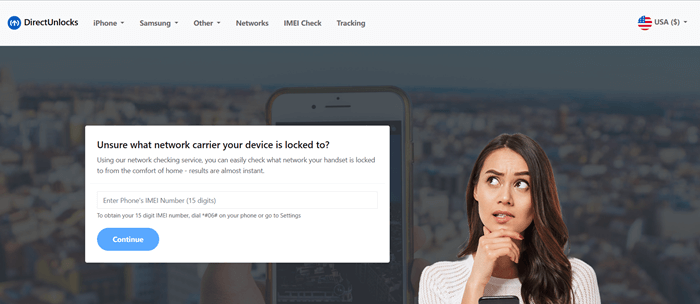
If you don't have a sim card, use an IMEI checker to test if your phone is locked.
Every phone has a unique IMEI number. Via that number, an IMEI checker tool can detect your device model and which network your phone is locked to.
That is particularly helpful when you purchased a locked phone on eBay and don't know which carrier originally locked the device.
Why Unlock Your Locked Phone from Carrier?
Unlocking your locked phone from carrier will provide you with a wider variety of phone plans to choose from.
If you don't unlock your phone, you will only be able to use it with a single carrier. That carrier may be expensive or may not offer plans that meet your specific call, text, and data needs.
Perhaps you want to buy a prepaid mobile plan, but the phone is locked to a postpaid provider that doesn't offer prepaid plans. Or, perhaps you are moving to another city where another carrier has better coverage.
Either way, removing network lock for your phone will prevent a major headache and make your life easier.
If you paid for a phone, you should be able to use it to its full capacity, and the only way to get your money's worth for your phone is to unlock it.
Otherwise, you will have to purchase a new phone, so you will end up spending a lot more money anyway for no reason.
Finally, if you plan on selling your phone, unlocking it first will increase its sale value and broaden your potential customer base. Most people don't want to buy a restricted phone, so unlocking it will allow you to sell it quicker and at a higher price.
How to Unlock a Locked Phone from Carrier
There are two ways to unlock your locked phone from carrier. The first is to use a trusted and certifiable unlocking service, and the second is to contact your carrier directly.
#1. DirectUnlocks

Direct Unlocks is a safe, manufacturer-approved, and legally-compliant unlocking service that can unlock any locked phone, regardless of which carrier it is tied to.
Our process is quick, secure, legit, and stress-free. Here are just some of the benefits of using DirectUnlocks:
- We process most unlocks within just 15 minutes.
- While some phones may take up to 24 hours to unlock, we provide a live tracking service, so you can check the status of your unlock at any time.
- Our process is one-time, permanent, and irreversible.
- If you have an iPhone, we will unlock it over 3G/4G, and if you have an Android, we will provide a code you can input to unlock it.
- You can use your phone throughout the unlock process.
- The process is entirely online and remote. You will not need to download any software, send us your phone, or leave the comfort of your home.
To unlock a phone safely and securely, follow these steps:
Unlock Your Phone Now!
- Using the embedded form, select your country and phone carrier.
- Enter your IMEI number into the required field. Find your IMEI number by dialing *#06# on your keypad.
- Pay securely via credit/debit card or Bitcoin, and the process will begin immediately.
We are available 24/7 to help you with the unlock process, so don't be afraid to reach out to our support team if you have any questions!
#2. Via Carrier

Another option is contacting your carrier directly for an unlock code. Under the CTIA commitment to the FCC, all major carriers have agreed to unlock phones upon request, but only if their conditions have been met.
This process varies slightly from one carrier to another, but here are the general steps:
- Contact your carrier by calling or emailing them, depending on the support methods it provides.
- Explain that you want to unlock your phone and request an unlock code.
- Wait up to two business days to receive your unlock code or an explanation of denial.
There are a few disadvantages to using this method, however:
- Carriers can deny your request if you haven't completed the initial contract or fulfilled other requirements.
- If you have a prepaid phone, the CTIA commitment states that carriers can wait one year before agreeing to your unlock request.
- Carriers have two business days to reply to your request, which is a bit long. It can take even longer if they have to contact the device manufacturer.
- If you did not purchase your phone from the carrier directly, they may not unlock it for you, or they may charge you a fee.
In other words, there is no guarantee that the carrier will unlock your phone, as it depends on certain conditions. It's much better to use DirectUnlocks for a guaranteed service within 24 hours.
Conclusion
Unlocking a locked phone from carrier will allow you to enjoy true freedom with your mobile device. You will be able to switch to other carriers whenever you want.
In addition, you will be able to take it abroad and use it with foreign carriers when traveling internationally, saving money on expensive roaming charges.
Why wait? Use DirectUnlocks to unlock your phone today!
You May Like