Like every other network carrier, T-Mobile will only unlock your phone if it meets the unlocking requirements. Part of the unlocking process involves the customer providing their account details so that T-Mobile can confirm they're eligible for a network unlock, but what if they don't have an account?
You'd think that you're stuck with T-Mobile if you don't have a T-Mobile account, but that's not the case. There are other methods you can use, and that's what we'll cover in this article: how to unlock your T-Mobile phone without a T-Mobile account.
How to Unlock a T-Mobile Phone Without an Account
If you didn't buy the phone yourself from T-Mobile, then you probably don't have an account linked to the phone. The good news is you don't need one. You can still unlock your phone without T-Mobile's help. Below are some of the methods you can try out:
DirectUnlocks
Topping the list is DirectUnlocks, an online service that will solve almost all your smartphone problems. Unlike similar services out there, you don't have to worry about the carrier your phone is locked to because DirectUnlocks supports all network carriers.
Features making DirectUnlocks the best carrier-lock removal service include:
- Guarantee a 100% success rate on T-Mobile phone unlocking.
- It's 100% legal. Apple and network carriers have approved using this tool.
- It's fast and efficient, get your phone unlocked instantly.
- It works remotely. You'll keep your phone and even use it while it's unlocked.
- It does not void your phone's warranty.
- It uses an IMEI number to unlock your phone; no complex software is needed.
Unlock a T-Mobile Phone without an Account
Unlocking a T-Mobile phone using DirectUnlocks is relatively easy. No technical knowledge is required to use this tool since all the details needed are readily available. No T-Mobile account is necessary, either!
Follow the steps outlined below to unlock your T-Mobile Phone.
Part 1: Getting Your Phone's IMEI Number
For services like DirectUnlocks that remotely unlock your phone, the International Mobile Equipment Identity (IMEI) number is the safest way to identify your device. You can find your phone's IMEI number in 2 ways:
a) Dial *#06#: This is the easiest method because your phone's IMEI number will be displayed on the screen as soon as you dial the number.
b) Check the Settings: The settings app of every phone has an "about page" that lists the device's information, such as the IMEI number. For example, on iPhones, go to Settings > General > About, and on Android phones, go to Settings > System > About phone/device or Settings > About phone/device.
The steps will vary depending on your phone, but when you find it, write it down because you'll need it in the next step.
Part 2: Unlocking Your Phone
Now that you have the IMEI number:
Step 1: Select the T-Mobile network your phone is locked to, and input your phone's IMEI number in the form below:
Order T-Mobile Phone Unlock
Step 2: Click the "Unlock Your T-Mobile Phone" button.
Step 3: On the next page, confirm the details you provided in the previous step. Check the box to agree to the terms of service, then click the "Pay With Credit/Debit Card" button. Enter your payment card details to complete your order.
DirectUnlocks will verify your order and then process it. A confirmation message will be sent to you, letting you know when your phone is ready. That's it. That's how you legally and permanently unlock your T-Mobile phone using DirectUnlocks.
iPhone Unlock Chip
Another method you can employ to unlock your T-Mobile iPhone is the iPhone unlock chip.
An unlock chip, such as Turbo SIM, is basically a tiny SIM-like chip that goes on top of your SIM card. It's designed to trick your locked phone by creating a fake IMEI number allowing your phone to support any carrier. When inserted into the phone, the chip will bypass the carrier restrictions enabling you to use SIM cards from other network carriers.
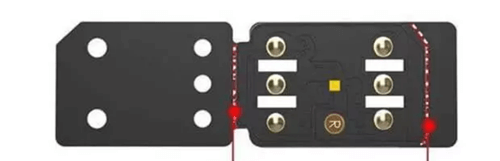
The unlock chips come in different variations with different names, but they achieve the same result at the end of the day. However, the similarity in functionality also means that they share disadvantages.
Why You Shouldn't Use an iPhone Unlock Chip
- As the name suggests, they only work on iPhones. Android users can't use this method, unfortunately.
- It reduces your iPhone's battery life.
- Not all iOS versions are supported. Some of these chips only support iOS 15.6 and above.
- It's been reported to affect SIM cards.
- It's temporary. Once you remove the chip, your phone will be locked again and only support T-Mobile SIM cards.
- They are pretty expensive. The total cost for the unlock chip and shipping charges might cost $30 or more.
- Not encouraged by Apple
Software Solution
The last solution in this list is to use unlocking software. Like the previous methods, several of these software exist online, and it's upon you to pick one that you can trust. Unlocking software requires you to download and install them on a computer, then follow the steps on the screen or from their website.
Why You Shouldn't Use Software Solutions
- Some technical knowledge is required during installation.
- Expensive: Most of them will include a free trial that only performs limited tasks. To get the carrier-lock unlocking service, you'll have to part with quite a lot of money.
- Not guaranteed to work: Most, if not all of them, do not work. Instead, the services only collect your personal information, such as card details, when you are purchasing the software.
- Not all OS versions are supported.
- Using them may result in data loss
- Not permanent: your phone will be locked again when you reset it.
- On iPhones, you may have to:
- Jailbreak your phone
- Turn off Find My iPhone
Comparing the Three Solutions…
Below is a quick comparison of the three solutions we've discussed above.
| Details | DirectUnlocks T-Mobile Unlock Service | iPhone Unlock Chip | Software Solution |
|---|---|---|---|
| Legal | Yes | No | No |
| Compatibility | All phones | iPhones | Limited brands |
| Remote Unlock | Yes | No | No |
| Warranty | Not voided | Not specified | Voided |
| Unlock Method | IMEI number | Chip installation | Software installation |
| Battery Life | Not affected | Affected | Might be affected |
| OS Support | All | Limited support | Limited support |
| Duration of Unlock | Permanent | Temporary | Temporary |
| Cost | Affordable | Expensive | Expensive |
| Guarantee of Success | Guaranteed | Not guaranteed | Not guaranteed |
| Data Loss | None | None | Possible |
| Additional Steps | None | None | Jailbreak, Turn off Find My iPhone |
As you can see from the table, the chances of unlocking your T-Mobile phone are incredibly high if you use DirectUnlocks. The other methods might work, but there's no guarantee.
Unlocking T-Mobile Phones FAQs
Are T-Mobile Phones Unlocked?
No, all T-Mobile phones are sold locked. Unless you pay the total price, you'll be under contract, and your phone will only support T-Mobile SIM cards.
Can T-Mobile Unlock My Phone?
T-Mobile can definitely unlock your phone. After all, they are the ones who locked it. However, please note that you must meet their unlock policy before your phone can be unlocked.
You must meet the following criteria to be eligible for T-Mobile network unlock:
- The phone must have been bought from T-Mobile
- The phone must not be on the blacklist (reported as lost, stolen, or fraudulent)
- Your T-Mobile account must be in good standing
For postpaid, the phone must have been on the T-Mobile network for at least days
For prepaid:
- The device must have been active on the T-Mobile network for not less than 365 days
- You can only unlock a maximum of 2 devices in one year.
Can I Unlock a T-Mobile Phone Myself?
Yes, it's possible to unlock a T-Mobile phone yourself. If unlocking it through T-Mobile is not an option, you can employ the three methods we discussed above. If you need an efficient, affordable, and simple process, I suggest you use DirectUnlocks T-Mobile unlock service. You won't be disappointed.
Final Thoughts
Suppose you've had enough of T-Mobile, then that's how to unlock your T-Mobile phone. The methods we've discussed above work, but if you need a guaranteed solution, then go for DirectUnlocks. Let us know in the comments section if the article has been helpful.
You May Like