Cell phones are usually restricted to working within a single carrier's network and won't pick up a signal if you switch the SIM Card.
However, that's not always the case—an unlocked cell phone is a smartphone that can pick up signals from any carrier and accept any modern SIM Card.
What is an Unlocked Cellphone?
An unlocked cellphone is a mobile phone that can access any network offered by mobile phone carriers.
Mobile service providers such as Verizon or AT&T offer phones at discounted rates to attract customers to their network plans. These phones are locked, meaning they are designed to operate exclusively on their respective networks.
For example, if you tried to use a Verizon phone with an AT&T SIM card, it wouldn't connect to the network.
That is the only functionality separating locked from unlocked phones, but it's significant. It affects you in many ways. For example, if you travel to a different country, your carrier's fees will be expensive, and you won't be able to use a local carrier.
Moreover, it restricts your ability to choose. With an unlocked phone, you could have one SIM card for data usage and a different one for calls and messages. You could mix your plans to get better services for less money and not compromise by choosing a single carrier.
Further reading: What is a factory unlocked iPhone?
Difference Between a Locked and Unlocked Phone

The main difference is that you can only access a single carrier's network from a locked phone.
This limitation won't affect customers that stay in the same areas and don't have plans to switch networks soon. Assuming their current network works consistently well.
For customers who travel frequently, a locked phone can be a hindrance. Carriers have stronger or weaker networks depending on the state, and their customers could find themselves without signal in certain places.
It gets worse for international travel. Customers won't be able to access data services unless they turn on Roaming data. This service allows you to access phone networks in other countries, but the prices will be expensive.
| Carrier | Monthly Starter Prices | Roaming Prices |
|---|---|---|
| Verizon | $43.00 | $10.00 per day |
| AT&T | $65.00 | $10.00 per day |
| T-Mobile | $60.00 | $0.25 per minute per call and limited internet speed. |
The prices in the middle of the table show how much the cheapest service from national carriers costs within the US per month. On the right is their cost every day while using Roaming data.
For Verizon and AT&T, you'll spend your entire monthly payment before a week passes. T-Mobile is more lenient, charging you for calls four times the usual rate but keeping everything else the same. With the exception that they'll limit the internet to an awful maximum of 256 kbps.
Pros and Cons of Unlocked Phones
Unlocked phones have more flexibility of use than blocked ones, but they aren't better on every account. Here's a list of the pros and cons of unlocked phones.
Pros
- Ability to change SIM Cards from any carrier
- Can access any phone network in the US
- Works with international SIM Cards
- Cheaper data prices in other countries
- Higher reselling value
- No long-term contracts
- Use of dual-SIM phones
Cons
- More expensive to purchase
- Less support from carrier companies
- Manufacturer warranties are inferior to carrier warranties for locked phones
- Certain models of phones are exclusive to some carriers
In short, unlocked phones offer more freedom to their users, while locked phones are easier to use. A locked phone comes ready to use after its first charge, while you need to set up the networks or buy the SIM cards you plan on using in your unlocked phone.
Things vary depending on how you use your phone, if we talk about pricing. You'll save money with a locked phone if you remain in the US but lose it if you travel internationally. Unlocked phones are more expensive, but they give you more when you resell them.
How to Check If Your Cellphone is Unlocked?
Your phone is likely locked if you got it from a carrier, especially within the initial contract period. Customers can unlock their phones after the contract expires or they finish paying a monthly payment plan.
But if you're unsure, there are ways to check if your phone is unlocked, though they depend on what type of phone you're using.
Checking if your iPhone is unlocked
You can buy unlocked iPhones directly from Apple, as the store lets you pick between an unlocked phone and one with a specific carrier. If you own an iPhone and don't know which one it is, you can check in two ways, depending on the iOS version.
iOS is the software running on every iPhone, and you can find out which one you have by going to Settings, tapping About, and checking the number to the right of "Software Version."
- For iOS 14 or higher, you can simply go into Settings, scroll down to General, and press About. There's an item called "Carrier Lock," if it says "No SIM restrictions" to its right, your phone is unlocked.
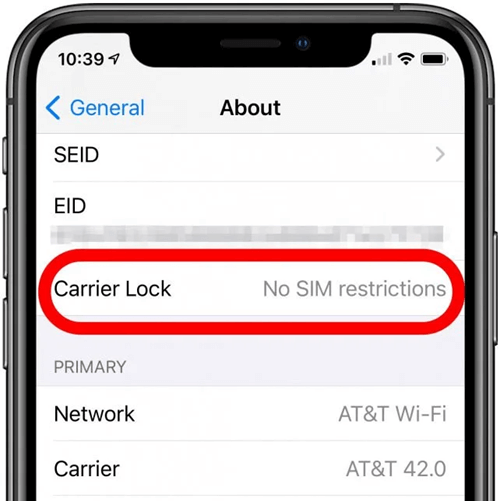
- Older iOS versions didn't have this option, but you can still check if you're using them. Simply go into Mobile Data inside Settings, and press Mobile Data Options. If you see the Mobile Data Network option, your phone is unlocked.
Checking if your Android phone is unlocked
Android phones have a lot of variations in software, making them wildly different to handle depending on the company and model. Some options that were present in a Samsung from three years ago may not be available in a current Motorola phone.
Sadly, this applies to ways of checking if your phone is unlocked. Here is how to check on a Samsung phone, as the brand is the leader in Android with over twenty percent of the US phone market.
Newer Samsung Models
Follow these four simple steps to check if your Samsung phone is unlocked:
- Go to Settings and tap Connections
- Scroll down to Mobile Networks
- Enter Mobile Operators
- Tap Search Now.
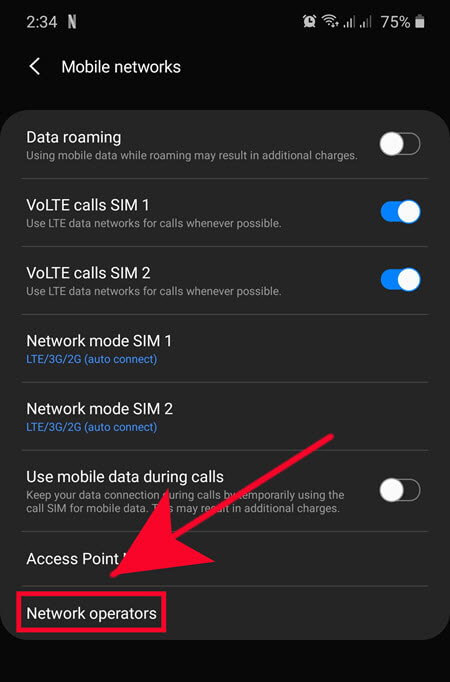
If your phone shows many options from different carriers after following these steps, it's unlocked.
Older Samsung Models
For older Samsung models, you can follow these steps to determine the status of the device lock:
- Access the dial pad on your phone, where you typically input phone numbers.
- Dial the code *#7465625#.
- After dialing, look for the indicators: "Network Lock," "Subset Lock," and "SP Lock.
If all three items are off, then your phone is unlocked.
These options aren't bulletproof, as the process can vary depending on the carrier you're using.
Thankfully, there's a way you can check with any phone, as long as you have a spare SIM card. Remove the SIM card from your phone and replace it with one from a different carrier.
If the phone can pick up a signal, that means your phone is unlocked.
What to do if your phone is locked? Keep reading to find how you can remove network lock for your phone.
How to Unlock a Locked Cell Phone
Unlocking your phone used to be a complex procedure. The only entity allowed to do it was your carrier, and they often tried to dissuade you from doing so in order to keep you as an exclusive customer.
And even when carriers started it, the process could take a long time and require you to provide unnecessary info. Thankfully, today there are remote services such as DirectUnlocks can easily unlock your phone without needing you to go to a physical store.
Direct Unlocks allows you to unlock your phone through a series of easy steps:
Unlock Your Phone Now
- Obtain the IMEI number of your phone by checking the About section in Settings or dialing *#06#
- Pick the country where you purchased your phone and select your carrier, and type your IMEI number
- Pay for the unlocking service and wait for your phone to be unlocked wirelessly.
Direct Unlocks has many unique features which make it the go-to service for unlocking phones.
For example, Direct Unlocks provides a 30-day refund policy in the unlikely event that your phone cannot be unlocked. Moreover, they assure that your device's warranty will stay intact throughout the duration of their services.
You're free to use your phone even while the service is going through. The unlocking process is certified by manufacturers, fast, and, most importantly, permanent.
Lastly, to back their claims, the site already has thousands of positive reviews about its service. Martin, from Safesite Reviews, talks about how unlocking his phone took over a day. Still, he's grateful for the personal support that helped him until it did.
Conclusion
Unlocked cellphones are smartphones that can access any network using SIM cards from any carrier. With an unlocked phone, you can switch between Verizon, AT&T, or T-Mobile at will—even international networks.
There's a long list of benefits to unlocking your phone. They range from being able to use any network you want to saving money that you'd otherwise spend on roaming costs when traveling.
Most phones are unlockable once the initial contract with their carrier ends, or immediately if they came directly from the manufacturer. Some carriers do offer to unlock phones, but it's widely known that they make the process longer and more complicated than necessary.
Services such as Direct Unlocks surfaced to solve this issue and make unlocking a phone quick, cheap, and convenient. Just give them your IMEI number, and they'll take care of the rest remotely, affordably, and efficiently.
You May Like