Are you trapped within the confines of the Cricket network?
If you purchased your phone from Cricket, you might have noticed that it's locked to their network. This restriction prevents you from switching carriers even when you spot a better data plan deal elsewhere. When signing up for a data plan it doesn't seem like a big burden to be locked to one network, but eventually, you'll find a better price somewhere else.
Don't worry, though. It's entirely possible to remove these limits and unlock your Cricket phone. This will give you the freedom to choose any network carrier that suits your budget and needs. In this article, we will walk you through the steps on how to unlock your Cricket phone without account, liberating you from these frustrating limitations.
How to Check if Your Cricket Phone is Locked
First things first, we need to check if your phone is locked. If it isn't locked then you don't have to do anything else and you can use any carrier's SIM card, otherwise you still need to unlock it. So, how do you go about checking if your phone is locked?
1. Via Settings
A quick way of finding this out is to dive into the phone's settings. You can follow the steps provided below depending on if you're using an iPhone or Android smartphone.
Checking an iPhone
Step #1 – Open the Settings app.
Step #2 – Tap on General then tap the About option.
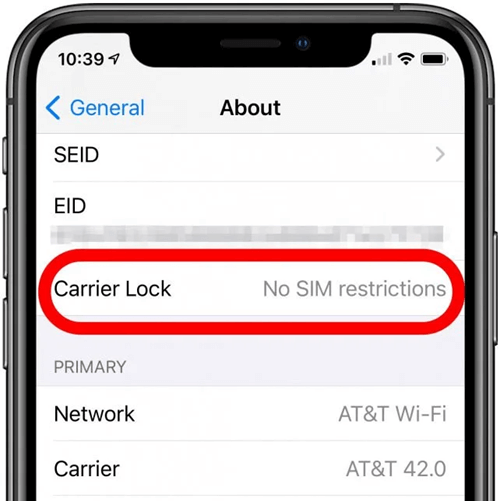
Step #3 – Swipe down this menu and tap on Carrier Lock.
Here, if your iPhone is locked to Cricket, it will say “SIM locked” and give you a short description of what this means. If your iPhone is unlocked, it will show "No SIM restrictions."
Checking an Android
Step #1 – Open the Settings app.
Step #2 – Tap on Connections then Network and Internet. The phrasing may differ slightly depending on the phone brand and model.
Step #3 – Tap Choose Network and if there is only one carrier network listed that means your Cricket phone is locked.
2. Switching SIM Cards

Another way to figure out if your phone is locked is to switch your current SIM card with a SIM card from a different network. In this case, using a SIM from any carrier that isn't Cricket will do the trick.
All you have to do is remove the SIM card, insert the other SIM card, and wait a few minutes. If you connect to the carrier without any issues and no relevant notifications appear, your Cricket phone is already unlocked. However, the chances are that you'll see a notification telling you that the SIM is not from the correct carrier and no connection can be made.
3. Using an IMEI Checker
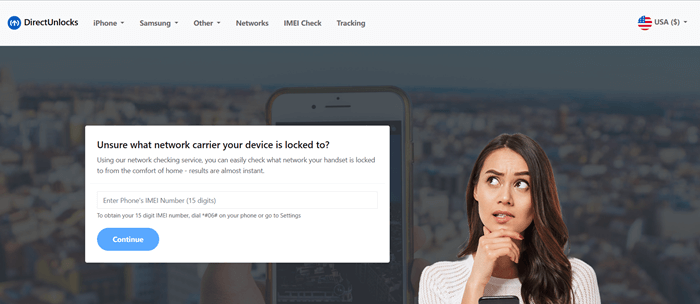
Alternatively, if you don't want to go through the tedious steps involved with navigating the Settings app or switching out the SIM card, you can use an IMEI checker.
With the DirectUnlocks IMEI Checker, you can quickly discover if your phone is locked and if it is, which carrier it's locked to. Here's how you can use this service.
Step #1 – Get your phone's IMEI number by dialling *#06# and it will be displayed on your screen.
Step #2 – Go to the IMEI Checker and type the IMEI number into the form.
Step #3 – Click Continue and follow the remaining steps to submit your order.
Before long, you'll know with certainty if your phone has been locked and which carrier the lock applies to. In this case, we already know that Cricket is the carrier in question, but it's always worth double-checking to make sure you follow the correct steps to unlock a Cricket phone!
You may like: Are Cricket Phones Unlocked?
How to Unlock a Cricket Phone without an Account?
Now that you know your phone is locked, you can go ahead and start unlocking it. There are two ways that you can go about doing so, and we'll be explaining both of them in detail.
1. DirectUnlocks
Your best option is to use a carrier unlocking service like DirectUnlocks which can quickly remove any carrier's restrictions from any device, iOS or Android without a Cricket account required.
Unlike using a shady software solution, this method will permanently disable the carrier lock and requires minimal effort on your part!
- Unlock Cricket phones without account required
- The best way to unlock any iOS or Android device
- 100% legal solution for unlocking phones
- Effective for unlocking Cricket phones and various other carriers
- Doesn't require you to jailbreak or root your device beforehand
- The entire unlocking process is handled remotely (you'll have your phone the whole time!)
- Cheaper than other carrier unlock services
We could keep going on and on but you get the point – DirectUnlocks is the best Cricket unlocking service to use. So, how does it work? If you want to take advantage of this service, here's what you need to do:
Step #1 – Start by getting your phone's IMEI number by dialling *#06# which will display the number on your screen.
Step #2 – Enter the IMEI number into the form below and click the Unlock Your Cricket Phone button.
Enter Your IMEI
Step #3 – Next, provide the requested details to pay for your order.
Step #4 – After your order is placed and the phone has been unlocked, you'll be notified via text and email letting you know that it can be used with any carrier.
All you have to do is spend a few minutes giving us the necessary information about your device and we'll take care of the rest. There are no downsides at all and if you want a quick and effortless way to unlock a Cricket phone, this is the one.
2. Software Solution (Not Recommended)
Your final option is to use a software solution, but we highly recommend that you don't do this. Regardless of the software you find to unlock a Cricket phone, you're going to be taking a lot of risks for a small chance of success (in most cases, software unlocks are unsuccessful).
Cons of Carrier Unlocking Software
- To use this type of software, you have to root or jailbreak your phone
- If you factory reset your phone, you'll have to use the software to unlock it again
- There is a risk that your phone will be bricked rendering it completely unusable
- If your phone has a warranty, it will be voided after you use the software
- There is no guarantee that the software you are using is safe
How to Unlock Cricket Phone with an Account?
Another way that you can unlock your Cricket phone is to get in touch with Cricket directly and submitting a request. You must read the Cricket unlock policy and ensure you meet all their requirements. Usually, this isn't recommended for a handful of reasons, but we'll get into that after we explain the process.
Step #1 – First, make sure you have the following information readily available:
- The SIM card's phone number
- The name of the Cricket account holder
- The phone's IMEI number
Step #2 – Contact the Cricket customer support team by either calling them or starting a Live Chat session on their website.
Step #3 – Once you are connected to a support agent, explain that you want to unlock your phone from their network.
Step #4 – At this point, they will ask for the information above. You may also be asked security questions that you would have set up when the Cricket account was initially activated.
Step #5 – After they have confirmed the information above, your unlock request will be submitted. Within 10 working days, you will receive a Cricket network unlock code for free and instructions for using it.
If you didn't already catch it, the big downside of contacting Cricket directly is that you'll end up waiting for around 10 working days to have your phone unlocked. This means any data plan deals that caught your eye could expire, or you simply may be unable to use your phone until then.
Furthermore, if there is a problem with the unlock code you receive, you'll have to submit a new request to Cricket which means waiting another 10 working days. All in all, this isn't the best way to unlock a Cricket phone if you want it taken care of quickly.
FAQs
Are Cricket phones already unlocked?
No. When you purchase a new phone from Cricket, the phone will be locked to the carrier's network by default. You can only unlock it by contacting them or using a service, such as DirectUnlocks. Note that some contracts have a wait time before the phone can be unlocked, often as long as 6 months after the contract has started.
How can I unlock a Cricket phone without the password?
If you have forgotten your Cricket account's password and can't sign in to request an unlock code, you can retrieve a temporary password. When signing in, click on Forgot Password and type your phone number into the box. After submitting the form, you'll be texted a temporary password to sign in.
Conclusion
Nowadays there's no reason for leaving your phone locked to a specific carrier. All this does is limit you to the plans that they offer and wipe out the chance of you getting a better deal elsewhere. It also means that if your monthly bill is increased, you have no choice but to pay it unless you want to lose your phone. The solution to these problems is unlocking the phone and that's why knowing how to unlock a Cricket phone without an account, or any phone for that matter, is important to know.